> For the complete documentation index, see [llms.txt](https://docs.phocassoftware.com/llms.txt). Markdown versions of documentation pages are available by appending `.md` to page URLs; this page is available as [Markdown](https://docs.phocassoftware.com/basics/getting-started/databases.md).
# Databases
Learn about databases, the foundation upon which your Phocas site is built.
Each database in Phocas is populated with raw data sourced from an ERP or other business system, which is commonly refreshed overnight. Your actions in Phocas do not affect that source data.
Common databases are Sales, Purchasing, Inventory, and Financial Statements, but you might see different databases depending on your Phocas setup and database permissions. Typically, financial databases open in the Financial Statements module, and all operational (non-financial) databases, such as Sales, open in the Analytics module.
## Ways to open a database
Whereas access to a database depends on multiple factors, you can physically access a database in the following ways:
{% tabs %}
{% tab title="Phocas homepage" %}
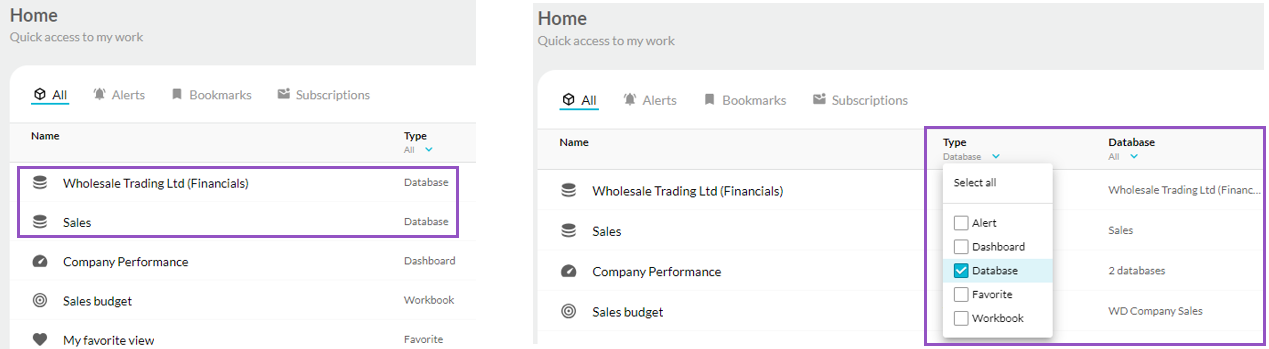
On your Phocas homepage, dashboard content items are identified by the database icon, as illustrated in the image on the left below. You can filter the grid to view data-specific items:
* To see a list of databases only, in the **Type** column header, click the **All** dropdown menu, click **Select none**, then select the **Database** checkbox and click out of the filter.
* To see only the content items in a specific database, in the **Database** column header, click the **All** dropdown menu, click **Select none**, then select the checkbox for that database and click out of the filter.
{% endtab %}
{% tab title="Phocas menu" %}
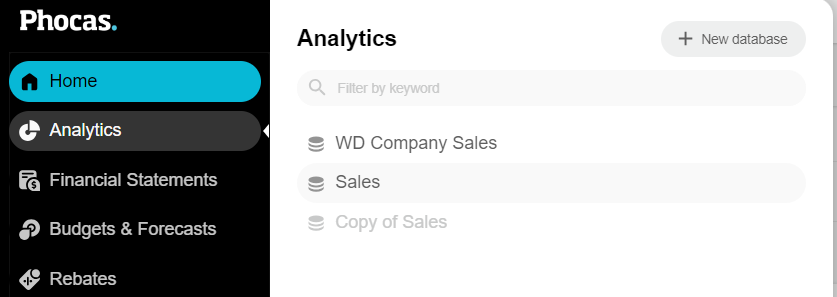
In the Phocas menu, click **Analytics** or **Financial Statements** to view a list of its databases, then click the database you want to open.
{% endtab %}
{% tab title="Recents menu" %}
After you open a database for the first time, it displays in your **Recents** list, which you can access via the Phocas menu.
{% endtab %}
{% endtabs %}
## Database status
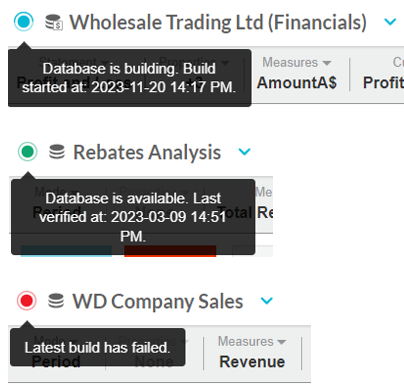
When you open a database, in the top left of the screen, you'll see the database name next to a colored dot. The color of the dot represents the database's status. A blue dot means the database is being rebuilt, green means the database is available, and red means the latest rebuild has failed, so there is a risk you are not looking at the latest data. You can hover over the dot to get more information.
## Suspended databases
Sometimes, databases become redundant, forgotten, or not used for a long period. These databases become *suspended* until they are next accessed. If you access a suspended database, you'll see a warning box to let you know that's the case, and a new build will kick off immediately. You don't need to do anything. The database, with updated data, will be available to use in around five minutes.
---
# Agent Instructions
This documentation is published with GitBook. GitBook is the documentation platform designed so that both humans and AI agents can read, navigate, and reason over technical content effectively. Learn more at gitbook.com.
## Querying This Documentation
If you need additional information that is not directly available in this page, you can query the documentation by asking a question.
Perform an HTTP GET request on the following URL with the `ask` and `goal` query parameters:
```
GET https://docs.phocassoftware.com/basics/getting-started/databases.md?ask=&goal=
```
`ask` is the immediate question: it should be specific, self-contained, and written in natural language.
`goal` is what the user is ultimately trying to achieve, the reason they need the answer. Sharing it helps GitBook give you a better, more relevant answer. A goal is most helpful when it describes the outcome the user wants rather than restating the question. For example, with `ask=how do I create an API token`, a goal like `automate deployments from our CI pipeline` lets GitBook tailor the answer to that use case.
The response will contain a direct answer to the question and relevant excerpts and sources from the documentation.
Use this mechanism when the answer is not explicitly present in the current page, you need clarification or additional context, or you want to retrieve related documentation sections.
.png?alt=media)