> For the complete documentation index, see [llms.txt](https://docs.phocassoftware.com/llms.txt). Markdown versions of documentation pages are available by appending `.md` to page URLs; this page is available as [Markdown](https://docs.phocassoftware.com/basics/other-tools/encrypt-share-secrets.md).
# Encrypt (share secrets)
Securely share secrets, such as sign-in credentials, with Phocas.
During implementation, we might ask you to share secrets with us (for example, credentials), and we might share secrets with you.
We recommend using [Phocas Encrypt](https://encrypt.phocassoftware.com) to share secrets securely. Avoid sharing secrets via email or other third-party tools.
### About Phocas Encrypt
Phocas Encrypt is hosted within our cloud environment. It uses end-to-end encryption to create one-time links to the secrets you want to share with a *single person* (for example, your Phocas Adoptions or Activations consultant).
When you share a secret:
* It's encrypted in your browser.
* It's stored in a database until retrieved.
* It can't be decrypted without the key.
Learn more about how we protect your data on the [Security information](/other-information/security-information.md) page.
### Send a secret
1. Open [https://encrypt.phocassoftware.com](https://encrypt.phocassoftware.com/). You usually receive this link during implementation.
2. Select the shortest deletion time that matches your current interaction with Phocas. For example:
* **One Hour**: If you're on the phone with a consultant.
* **One Day**: If you're working over email and it’s not Friday.
* **One Week**: Other cases.
3. Leave **One-time download** and **Generate decryption key** selected.
4. Add your secret using your preferred method:
* **Use the form**: In the **Your Secret** box, type or paste your secret, then click **Encrypt Message**.
* **Upload a file**: In the top-right corner, click **Upload**, then locate the file on your computer and drag it into the upload area.
5. Choose which link type to use:
* **One-click link** (easiest): Includes **both the secret ID and decryption key**. There is a small risk of exposing it if someone else clicks the link first. Only use if interception risk is low.
* **Short link** (most secure): Includes **only the secret ID**. You must **send the decryption key separately** using another communication method.
6. Choose how to share the link:
* **Copy**: Copies the link to your clipboard. Paste it into your preferred communication channel and send it to the recipient.
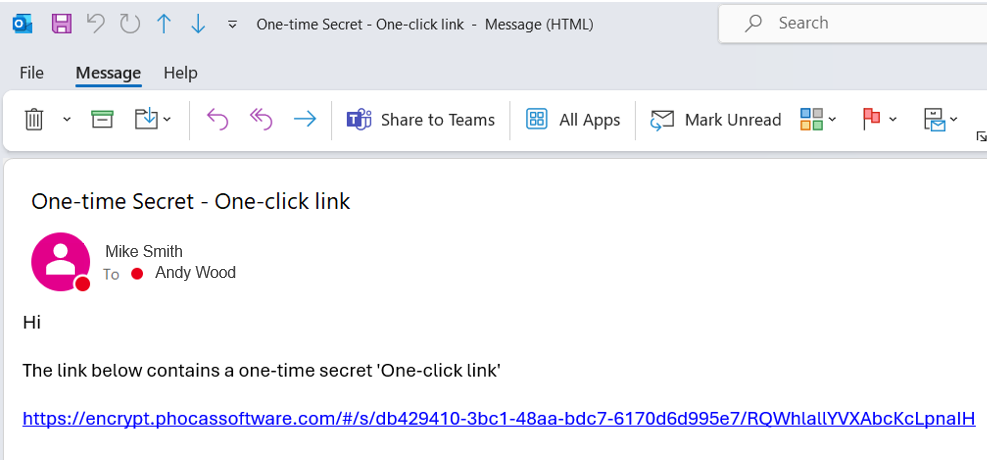
* **Email**: Opens your default email application with a draft email containing the link. Complete the email and send it to the recipient.
7. If you share a **short link** (step 5 above), copy the **Decryption key** and send it to the recipient using a different communication method (for example, phone call or SMS).
8. Close the browser window.
### Receive a secret
You’ll receive an email or message containing the link.
1. Click the link. This opens a warning message explaining that you are about to retrieve a one-time secret.
2. Click **Reveal Secure Message**.
3. View the decrypted message or download the file. In the case of a message:
1. **Show** displays decrypted text and **Copy** copies it to your clipboard.
2. **Show QR Code** allows you to share the secret with a mobile device.
4. Use the secret before closing the page - the link only works once.
### Troubleshooting
1. **Link doesn’t work?**
It might have:
* Already been clicked.
* Expired based on the deletion time.
If you are the **sender**, repeat the steps to resend.\
If you are the **receiver**, ask the sender to resend.
2. **Can't copy the secret on a mobile device?**
Some mobile devices don't display a **Copy** option immediately after scanning the QR code.
For example, on an iPhone, tap the scan icon .png?alt=media) after scanning the QR code to display the **Copy** option.
---
# Agent Instructions
This documentation is published with GitBook. GitBook is the documentation platform designed so that both humans and AI agents can read, navigate, and reason over technical content effectively. Learn more at gitbook.com.
## Querying This Documentation
If you need additional information that is not directly available in this page, you can query the documentation by asking a question.
Perform an HTTP GET request on the following URL with the `ask` and `goal` query parameters:
```
GET https://docs.phocassoftware.com/basics/other-tools/encrypt-share-secrets.md?ask=&goal=
```
`ask` is the immediate question: it should be specific, self-contained, and written in natural language.
`goal` is what the user is ultimately trying to achieve, the reason they need the answer. Sharing it helps GitBook give you a better, more relevant answer. A goal is most helpful when it describes the outcome the user wants rather than restating the question. For example, with `ask=how do I create an API token`, a goal like `automate deployments from our CI pipeline` lets GitBook tailor the answer to that use case.
The response will contain a direct answer to the question and relevant excerpts and sources from the documentation.
Use this mechanism when the answer is not explicitly present in the current page, you need clarification or additional context, or you want to retrieve related documentation sections.
after scanning the QR code to display the **Copy** option.
---
# Agent Instructions
This documentation is published with GitBook. GitBook is the documentation platform designed so that both humans and AI agents can read, navigate, and reason over technical content effectively. Learn more at gitbook.com.
## Querying This Documentation
If you need additional information that is not directly available in this page, you can query the documentation by asking a question.
Perform an HTTP GET request on the following URL with the `ask` and `goal` query parameters:
```
GET https://docs.phocassoftware.com/basics/other-tools/encrypt-share-secrets.md?ask=&goal=
```
`ask` is the immediate question: it should be specific, self-contained, and written in natural language.
`goal` is what the user is ultimately trying to achieve, the reason they need the answer. Sharing it helps GitBook give you a better, more relevant answer. A goal is most helpful when it describes the outcome the user wants rather than restating the question. For example, with `ask=how do I create an API token`, a goal like `automate deployments from our CI pipeline` lets GitBook tailor the answer to that use case.
The response will contain a direct answer to the question and relevant excerpts and sources from the documentation.
Use this mechanism when the answer is not explicitly present in the current page, you need clarification or additional context, or you want to retrieve related documentation sections.
.png?alt=media)
.png?alt=media)
.png?alt=media)


.png?alt=media)
.png?alt=media)
.png?alt=media)
.png?alt=media)