> For the complete documentation index, see [llms.txt](https://docs.phocassoftware.com/llms.txt). Markdown versions of documentation pages are available by appending `.md` to page URLs; this page is available as [Markdown](https://docs.phocassoftware.com/budgets-and-forecasts/getting-started/overview-of-key-terms-and-concepts/overview-of-3-statement-budgeting.md).
# 3-statement budgeting
Learn about how Budgets & Forecasts supports an integrated financial model known as 3-statement budgeting.
The 3-statement budgeting model consolidates the projections in three key financial statements, allowing you to forecast your future cash position and overall financial health. With such information, you can predict outcomes of various scenarios, such as:
* Lower sales during an economic downturn.
* Changes in hiring plans.
* Financial implications of acquiring new equipment.
You can then compare projected outcomes to actual results, assess what worked well, and adjust your strategies accordingly.
With better insights into your future financial position, you can improve your cash flow management, make more informed strategic decisions, and minimize risk.
## The three statements
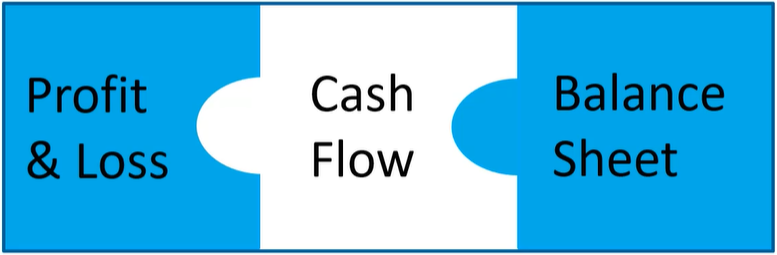
As the name suggests, 3-statement budgeting involves budgeting for three financial statements:
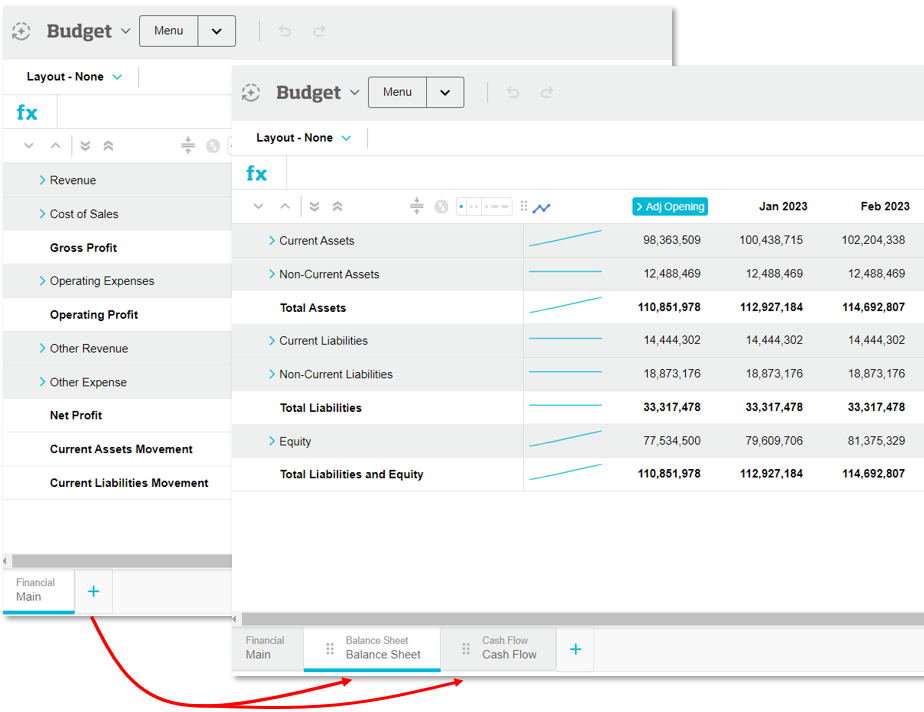
* **Profit and Loss (P\&L or Income Statement) budget**: The expected value of your income and expenses over a specific period and therefore, a calculation of profitability. This budget displays in the Main tab of a financial budget workbook.
* **Balance Sheet budget**: The expected value of your assets, liabilities and equity at a point in time. This budget can be added as a new tab in the workbook.
* **Cash Flow budget**: The movement of cash (inflows and outflows) from operating, investing, and financing activities throughout the year to explain how you got from the start of your cash position to your end cash position. Simply put, the Cash Flow shows where your money is coming from and what you are spending that money on. This budget is created automatically in a new tab when the Balance Sheet tab is added. Its values are entirely inferred; they are calculated automatically based on how the P\&L and Balance Sheet move.
You actively budget for the P\&L and Balance Sheet, and from those budgets, you derive your Cash Flow budget.
## The 3-statement budgeting process
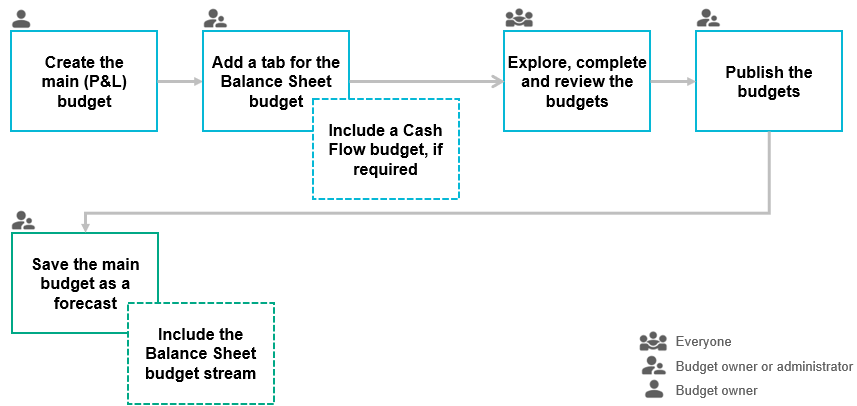
The following diagram illustrates the key steps in the 3-statement budgeting process, along with who is involved.
1. [Create the budget](/budgets-and-forecasts/owner-and-administrator/create-a-budget.md).
2. [Add the Balance Sheet and Cash Flow tabs](/budgets-and-forecasts/owner-and-administrator/add-worksheet-tabs/balance-sheet-cash-flow-tabs.md).
3. [Explore](/budgets-and-forecasts/getting-started/take-a-tour-of-budgets-and-forecasts/explore-the-balance-sheet-and-cash-flow-budgets.md), [complete](/budgets-and-forecasts/contributor/edit-values-in-a-worksheet/edit-the-balance-sheet-budget.md) and [review](/budgets-and-forecasts/contributor/review-the-budget-or-forecast.md) the budgets.
4. [Publish the budgets](/budgets-and-forecasts/owner-and-administrator/publish-a-budget-forecast-or-other-worksheet-tab.md).
5. [Save the main budget as a forecast](/budgets-and-forecasts/owner-and-administrator/create-a-forecast.md), including the Balance Sheet and Cash Flow budgets.
## **Related pages**
For all budget users:
* [Explore the Balance Sheet and Cash Flow budgets](/budgets-and-forecasts/getting-started/take-a-tour-of-budgets-and-forecasts/explore-the-balance-sheet-and-cash-flow-budgets.md)
* [Edit the Balance Sheet budget](/budgets-and-forecasts/contributor/edit-values-in-a-worksheet/edit-the-balance-sheet-budget.md)
* [Explore the forecast](/budgets-and-forecasts/getting-started/take-a-tour-of-budgets-and-forecasts/explore-the-forecast-workbook.md)
For budget owners and administrators:
* [Add a Balance Sheet and Cash Flow tab](/budgets-and-forecasts/owner-and-administrator/add-worksheet-tabs/balance-sheet-cash-flow-tabs.md) (for 3-statement budgeting)
* [Use mini drivers in the Balance Sheet budget](/budgets-and-forecasts/owner-and-administrator/add-worksheet-tabs/balance-sheet-cash-flow-tabs.md#use-mini-drivers-in-the-balance-sheet-budget)
{% hint style="success" %}
Watch these videos:
* Phocas demo video: [3 statement forecasting](https://www.phocassoftware.com/watch-demo/3-statement-forecasting?autoplay=true) (brief overview)
* PUG Training: [3-statement budgeting](https://www.phocassoftware.com/customer/training-series/budgets-forecasts#session3)
{% endhint %}
---
# Agent Instructions
This documentation is published with GitBook. GitBook is the documentation platform designed so that both humans and AI agents can read, navigate, and reason over technical content effectively. Learn more at gitbook.com.
## Querying This Documentation
If you need additional information that is not directly available in this page, you can query the documentation by asking a question.
Perform an HTTP GET request on the following URL with the `ask` and `goal` query parameters:
```
GET https://docs.phocassoftware.com/budgets-and-forecasts/getting-started/overview-of-key-terms-and-concepts/overview-of-3-statement-budgeting.md?ask=&goal=
```
`ask` is the immediate question: it should be specific, self-contained, and written in natural language.
`goal` is what the user is ultimately trying to achieve, the reason they need the answer. Sharing it helps GitBook give you a better, more relevant answer. A goal is most helpful when it describes the outcome the user wants rather than restating the question. For example, with `ask=how do I create an API token`, a goal like `automate deployments from our CI pipeline` lets GitBook tailor the answer to that use case.
The response will contain a direct answer to the question and relevant excerpts and sources from the documentation.
Use this mechanism when the answer is not explicitly present in the current page, you need clarification or additional context, or you want to retrieve related documentation sections.